

WebZum for Chiropractors
Tell WebZum about your practice, or paste your Google Maps link.
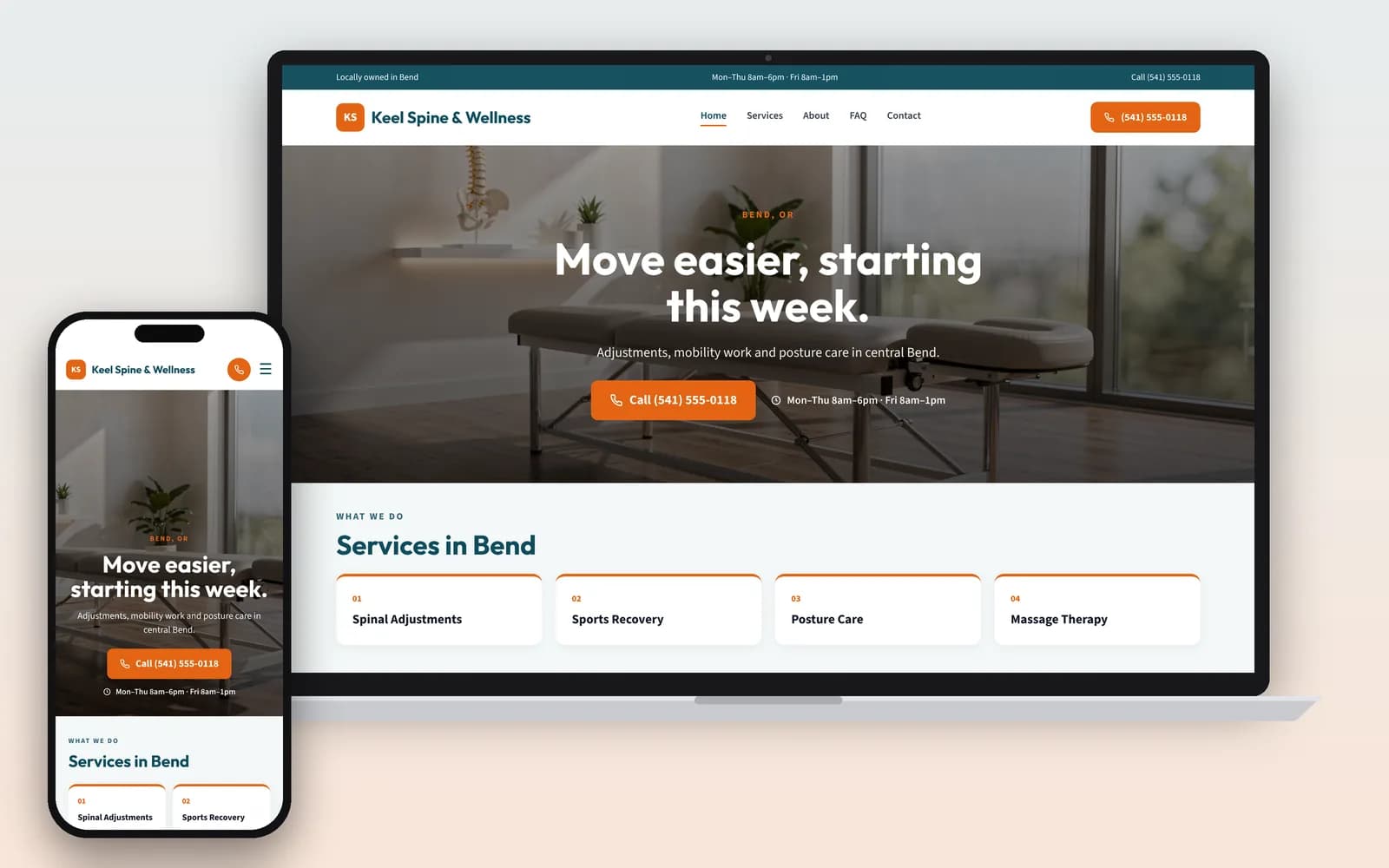
In about 5 minutes you get a multi-page chiropractic website: what you treat, your hours, what a first visit looks like, and a clear way to book.
Preview it free for 30 days after you sign up.
Basic is $19/mo, Professional is $34/mo.
Signup required. 30-day money-back guarantee on every plan. See how it works
Who is looking for a chiropractor?
More people than 20 years ago, and most of them are in pain. In 2022, 11.0% of US adults got chiropractic care, up from 7.4% in 2002 (NCCIH). Of those, 85.7% used it for pain management (NCCIH). So your site has to answer someone who hurts, fast: what do you treat, can I get in, and what will it cost?
More practices want those patients, too. The BLS counts 61,700 chiropractor jobs in 2025, projected to grow 9% by 2035, "much faster than the average for all occupations." About 36% of chiropractors are self-employed (BLS), which means most owners are also their own marketing team.
What should a chiropractic website include?
What you treat, who you are, what it costs, and how to book. Here is what WebZum writes into your site, and why each part matters for a chiropractor.
- One page for each main thing you treat. Low back pain, neck pain, sports injuries, prenatal care, auto injuries: only what you actually see. Someone searching "chiropractor for sciatica" should land on the right page.
- Your license and training. "Every state requires chiropractors to be licensed," and a D.C. program typically takes about 4 years on top of at least 3 years of undergraduate study (BLS). Put your D.C., your state license and any diplomate credentials on your About page.
- An honest Medicare note. Medicare Part B only covers a chiropractor's adjustments of the spine to correct a subluxation. It doesn't cover other services or tests a chiropractor orders, like X-rays, massage therapy or acupuncture, and after the Part B deductible the patient pays 20% of the Medicare-approved amount (Medicare.gov). A short "Insurance & Medicare" page saves your front desk a lot of calls.
- Evening and weekend hours, if you have them. BLS notes chiropractors' schedules may "include evenings or weekends to accommodate patients" (BLS). If yours do, make them easy to find.
- What happens on a first visit. Tell WebZum what your first visit includes, in order. A plain walkthrough calms a nervous first-timer.
- A booking path you control. Add a button that goes to the scheduler you already use. The WebZum editor can add outside booking widgets and links.
What should a chiropractic website not say?
Don't promise what you can't prove. In April 2020, FTC staff sent a warning letter to a Georgia chiropractic practice over a page on its website that said adjustments raise your immunity against COVID-19. The letter says it is unlawful to advertise that a service can "prevent, treat, or cure human disease" without "competent and reliable scientific evidence," and told the practice to review all other claims for its services too (FTC warning letter, Apr 23, 2020).
When you build with WebZum, tell the chat what you do and don't claim: "We treat back and neck pain. Don't say we cure or prevent disease." Then read every service page before you publish. You can change any line by typing the fix.
Keep health details off your public site. Use your WebZum site for a name, a phone number and what they need help with. Send intake forms and health history through your EHR or scheduler, and link to it from your menu. WebZum is your public website, not a patient-records tool.
This is general information, not legal advice. Rules vary by state; check with your licensing board or a lawyer.
How do you set up your chiropractic website with WebZum?
Type what you want in the editor chat and the site changes. These are real WebZum features; the prompts are examples for a chiropractic office.
| What you want | What you type | What happens |
|---|---|---|
| Add a service page | "Add a page for auto injury care: whiplash, neck and back pain after a car accident." | A new page is added to your menu and written for you. |
| Add an insurance page | "Add an Insurance & Medicare page. List the plans we're in-network with: [your plans]." | The page is added. You check the plan names before you publish. |
| Show Saturday hours | "We're open Saturdays 8 to noon." | You click Update business info; the site updates in about 30 seconds. |
| Link your scheduler | "Add a Book Now button that goes to [your scheduler link]." | The editor adds the outside booking widget or link. |
| Swap a photo | "Swap this photo for a bright, clean treatment room with an adjusting table, no text in the image." | A new photo is made and put in place. |
| Reach Spanish-speaking patients | "Add a Spanish version of the site." (how it works) | A language menu is added (30+ languages). |
New patients search when they hurt. From the editor, WebZum drafts a Google search ad from your site, with a call button. You set the area around your office, keywords like "chiropractor near me" or "sciatica chiropractor", and the hours it runs, for example only while your front desk can pick up.
Chiropractic web design options compared
How we compared: how the site gets built, monthly price from each company's own page (checked Oct 21, 2026), and whether it ties into your practice software.
| WebZum | General builder (e.g. Hostinger) | Practice software add-on (e.g. Jane Websites) | |
|---|---|---|---|
| How it's built | Describe your practice; pages written for you in about 5 minutes | AI from 3 questions, or pick from 300+ layouts (Hostinger) | AI site that pulls services, practitioners and contact details from your Jane account daily (Jane) |
| Monthly price | Basic $19/mo; Professional $34/mo (own domain) | $2.49/mo when you prepay 48 months; renews at $10.99/mo | $59/mo add-on to a Jane account |
| Booking | Link or widget for the scheduler you already use | Built-in booking with Google Calendar sync | Your Jane booking |
| Editing | Type the change in chat | Drag and drop, plus AI writing tools | Block editor |
| Same-day Google ad from your site | Yes | Not listed | Not listed |
| Try before paying | 30-day free preview after signup | Varies by plan | Free setup; you pay when you launch |
Choose practice software instead if you already run your clinic on Jane (or plan to) and want the site to update from it. Choose WebZum if your scheduler and EHR already work and you want a better website live this week, without writing it yourself.
Already have a chiropractic website?
Paste its address into the build chat. WebZum reads up to 5 pages (home, about, services, contact), keeps your real practice details and up to 12 of your best photos, and writes new pages. It won't copy your old text word for word or keep your logo, so upload your logo file. Use a site you own. Your old site stays up until you point your domain to WebZum (custom domains are on Professional).
Rebuild my practice siteWhich chiropractic practices is it for?
Solo DCs · Family chiropractic · Sports chiropractic · Prenatal and pediatric care · Auto injury care · Multi-doctor practices. If you focus on one group (runners, pregnant patients, desk workers), say so in the first chat, and the site gets written around them.